Silent Bots watches interfaces, recognizes what is on screen, and runs the workflows you configure across supported games and applications.
From $10/mo · multi-emulator profiles · Windows & macOS · emulator support
Screen-aware workflows for interfaces that do not offer a traditional integration or API.
Template matching and OCR recognize controls, text, and interface states across supported apps and emulators.
Choose ready-made automation packs, configure the actions you need, and reuse them across account profiles.
Workflows can verify screen state, retry expected actions, and pause when a required control is unavailable.
Give each account its own settings and decide when selected workflows should run or take a break.
Forgot an automation was running? Open the Remote App to pause or stop one session—or shut down every session on your account.
New automation packs and product updates are delivered as the supported library grows.
Download the desktop app for Windows or macOS and connect the device or application required by your automation pack.
Select a supported automation pack, enable the tasks you need, and save the settings to an account profile.
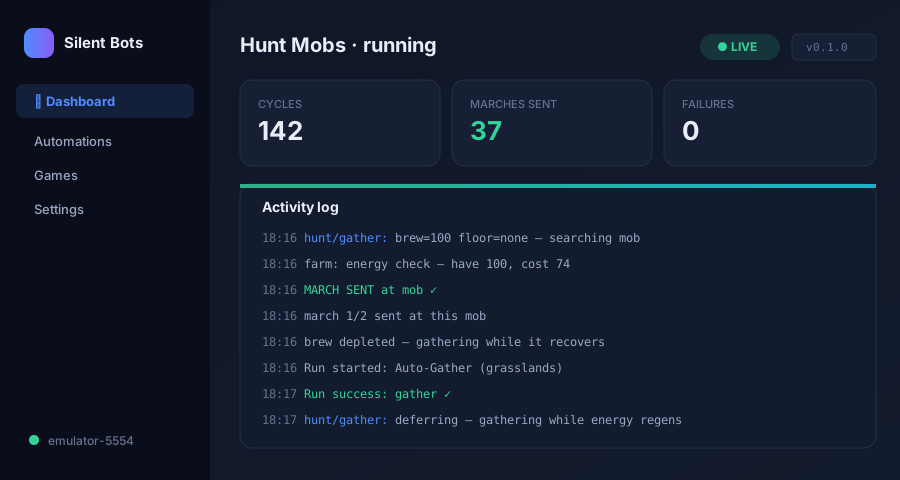
Run the workflow, follow its activity log, and stop active sessions from the app or your account dashboard.
Start with available game and emulator workflows, then add new integrations as the library expands.
Explore the premium KOH automation pack for mob hunting, gathering, chests, city timers, dragons, resource transfers, and daily rewards.
Use the same screen-aware engine for supported applications and repetitive visual processes.
Tell us what you want to automate and help prioritize the next Basic or Premium automation pack.
Start with a 24-hour free trial, choose essential KOH automation, add live protection, or unlock the complete library and full remote control.
Every Basic automation
Every Basic and Premium KOH automation
Every current and future automation pack
Choose an automation pack, configure it for your workflow, and manage it from one place.
See plans →